
The ‘BOM Associates’ Tab
The Product Levels Addon ads a new tab called BOM Associates within Product Data section. This tab is only visible in BOM products and shows the list of Products/BOMs that had this BOM associated within.
NOTE:BOM Associates Tab it’s only available with the BOM Stock Control option enabled and it’s only for BOM products. You can learn how to enable BOM Stock Control here.
To view the BOM Associates Tab:
- Go to the BOM product page.
- Navigate to Product Data Section.
- Click the BOM Associates Tab.
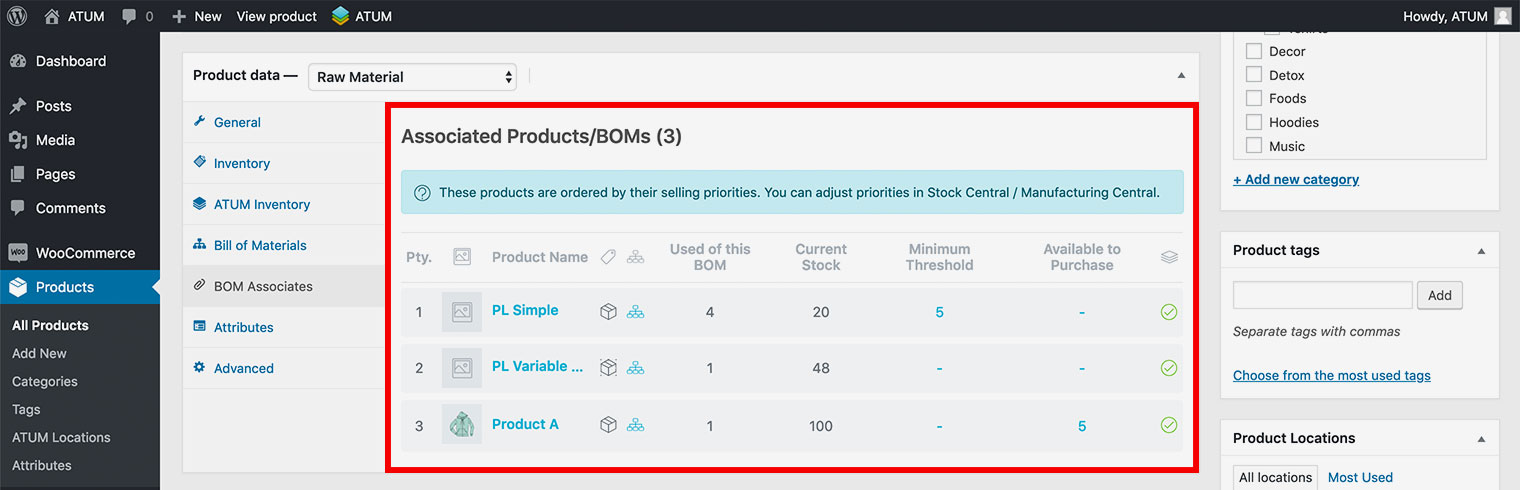
In this tab you will see the list of Products/BOMs that are using this Raw Material/Product Part (BOM). This list shows the following info of the associates Product/BOMs:
- Priority.
- Thumbnail.
- Product Type.
- Hierarchy Tree.
- Units used of this BOM.
- Current stock quantity.
- Minimum Threshold.
- Available to purchase quantity.
- Stock Status.